Decomposing a Large Codebase Into Git Submodules
By Hildeberto Mendonca, on Saturday, June 28, 2025
We recognize good developers by their capacity for cleaning existing code and adding a minimal amount of code for new features. Their pull requests are compact, favoring reusability and elegance. But even with their effort, some codebases are simply large due to the complexity of the business. That is the case of OSIS, an open source software designed to manage the core business of the Université catholique de Louvain.
OSIS is a Django project, composed of several applications. These applications could have their own resources or share resources with other applications. They could even be activated or deactivated at runtime, which means the entire codebase is not necessarily running in production. This architecture is so flexible that the IT department of the university decided to stimulate other departments, in need of a business application, to develop apps for OSIS, instead of other heterogeneous choices. We kindly called them "Satellite Apps" in the "OSIS Constellation". The strategy worked. Several apps were developed by different teams.
However, those apps had tripled OSIS' codebase, making it larger than what was originally planned. It isn't so serious in the case of a Python project because there is no such things as compilation, packaging or startup time. But a large codebase is harder to maintain and, when developed by multiple teams, could cause several workflow issues.
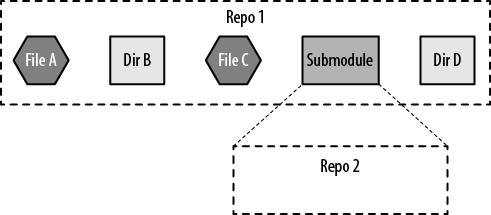
To address this problem, we picked one of the apps, externalized it in a
different repository and added it back to OSIS as a
Git submodule. Some of you may argue that
Git subtree is a better option compared to Git submodule
because of its transparency to other developers, but it is much more complex
to configure, push and pull with the remote repository than to perform a single
command like git submodule update whenever needed. Actually, we had been
working with submodule for a while and we had no major issues up to this point.
Others might also have argued that it was time for micro services. Well, we didn't see it as an advantage just yet because we might reduce the codebase but we would, at the same time, complicate the architecture with an additional web service layer, additional security measures and more configurations. We didn't even have the excuse of a performance issue, so the added value was obviously not there yet. But when the time comes, what we have done will certainly simplify the transition to micro services.
Moving the Internship App to a New Repository
I was working on the Internship app, one of those satellite apps, and here was a step-by-step guide to move the app to another repository and add it back as a submodule of OSIS. To avoid messing up my programming environment, I had decided to do everything in a temporary folder:
$ cd ~/python/projects/osis
$ mkdir temp
Then we cloned the OSIS repository inside of the temporary folder:
$ cd temp
$ git clone https://github.com/uclouvain/osis.git
To preserve the history of changes in the Internship app, we decided to start the new repository from a clone of OSIS:
$ git clone osis ./osis-internship
$ cd osis-internship
The default branch of OSIS was dev. After cloning it, the branch of
osis-internship was also dev, so we had to create a master branch from
dev, but you didn't have to do that if you had cloned the master branch of
your repository:
$ git checkout -b masterAt that point, the repository osis-internship was ready for the clean up. The
intention here was to remove all files that weren't part of Internship, put the
content of the folder internship in the root of the repository and remove the
folder internship:
$ git rm -rf assessments/ backoffice/ assistant/ base/ dissertation/ \
             reference/ attribution/ cms/ doc/ osis_common/ dev-settings.py \
             Dockerfile __init__.py
$ git mv internship/* .
$ rm -rf internship
This was an important step, so we committed these changes. In this project, we put the number of the issue we were working on in the commit message:
$ git commit -m "INTERNSHIP-1 Removed unnecessary resources and moved the " \
                "content of the folder 'internship' to the root."
The last steps for the repository osis-internship were to create a new
repository on GitHub, reset the remote origin to point to this new GitHub
repository and push the local master branch:
$ git remote set-url origin https://github.com/uclouvain/osis-internship.git
$ git push origin master
The repository osis-internship now contained only the artifacts of the Internship app.
Creating the Submodule in the OSIS Repository
Moving back to osis, we removed the folder internship and committed the
change:
$ cd ../osis
$ git rm -rf internship/
$ git commit -m "OSIS-195 Folder 'internship' removed."
Then we added the repository uclouvain/osis-internship as a submodule of
osis:
$ git submodule add https://github.com/uclouvain/osis-internship.git \
      ./internship
$ git submodule init
$ git submodule update
Finally, we committed and pushed the change to GitHub:
$ git commit -m "OSIS-195 Submodule 'internship' added."
$ git push origin dev
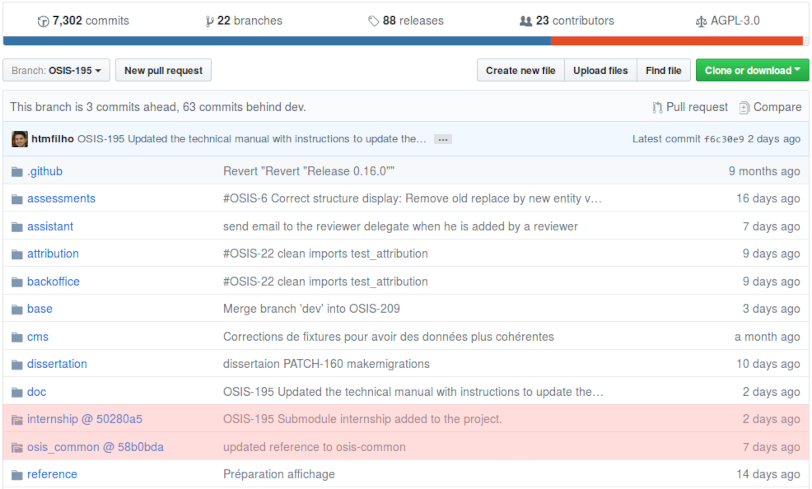
Voilà! The new submodule was added to the codebase of OSIS, which is now smaller, since a submodule is just a reference to another repository.
How to Develop in the New Submodule
At that point, the submodule was ready to be developed, but we had done everything in a temporary folder. So, we had to get back to the working environment and pull the latest changes:
$ cd ~/python/projects/osis/osis
$ git pull origin dev
Then we set up the local submodule:
$ git submodule init
$ git submodule update
This setup was necessary every time the repository was cloned. After that, the only command we needed to remember was:
$ git submodule updatewhich would be useful when somebody else updated the reference to the
internship repository, thus the latest modifications were not in loco yet.
Using submodule we had a repository inside another one. So, when we were at
the osis repository and typed git status we saw the active branch was dev.
But when we entered the submodule internship and typed git status, we saw
the active branch was master. These repositories had different remote origins
(check with git remote -v), thus when we committed and pushed changes they
went to their respective repositories. Therefore, developing osis-internship
consisted of pulling, branching, committing, pushing and everything else in the
submodule internship.
We would add, in conclusion, that another important motivation to move an application to another repository was to have an independent lifecycle from the rest of the system. This was particularly important in applications developed by different teams under distinct context and subordination. Imagine how difficult it was to coordinate all parties to have a synchronized release under short iteration cycles. Using submodules, the application could evolve according to the pace of its team and be released without interfering on other projects' deadlines.